Wednesday, March 23, 2011

D7000 ISO 1000 Sample

Nikon D7000 with Nikkor 300mm VR f/2.8 MK1 and TC-17e (effectively a 765mm lens). ISO1000, 1/500s @ f/4.8 (wide open), handheld. Shot in RAW and post processed with NX2, Noise Ninja and Nik Sharpener Pro.

Oh, and by the way this is a 2.6 megapixel crop from the original ;-)

Tuesday, March 15, 2011

Dear Mr Nikon

Finally got to have a play with one of your D7000's, and I must say, a very nice camera it is. Light, compact and sturdily made. Image quality looks mighty good to, right up to ISO 1600-3200.

I love that the dinky little IR remote can operate properly in mirror-up mode (first click raises mirror, second click fires shutter), and there is even an IR sensor on the back of the camera. Perfect for landscapers like me, and a lot less hassle than the 10-pin remote on your professional cameras! I stuck on a DK-21M magnifying eyepiece and even the viewfinder did not seem too 'claustrophobic', and the simple switch that takes you into Liveview is really cool.

However, nothing's perfect. Most shocking is that your PC-E lenses won't fit, and bizarrely, this is not because the control knobs foul the camera body, but it's actually the lens barrel itself that threatens to scratch the underside of the flash housing. I tried rotating the lens to all sorts of combinations before attempting to mount it... to no avail (apart from a little scratch on the flash housing).

So, here's my challenge to you: make a D7000m. It's a simple idea, a stripped-down version aimed fair and square at real enthusiasts, not just those that had megapixel-envy. Here's the recipe:
  1. Remove the flash (I'll never use it). Presumably there's a microswitch that tells the electronics that the flash is raised: hard-wire it or leave it open so the camera never thinks the flash is raised (cost: probably a net saving on parts).
  2. Make a new moulding to replace the one that surrounds the lens mount and forms the underside of the flash housing. You could make the front of the camera flush to the lens mount, or leave the vestiges of a pentaprism bulge if you must, just as long as the PC-E lenses work (cost: a fair bit for re-tooling, but it is only one part of the body moulding that has to be changed).
  3. Take out the AF systems and the motor - I don't need it - at the same time you can remove the AF/MF switch, and as it fits through the moulding you're replacing in 2., just blank it off in the new moulding (cost: net cost saving, subsidising the new tooling required for 2.).
  4. Replace the mode switch on the top left of the camera with one that has only 2 positions, 'A' and 'M'. The new switch can use exactly the same form factor as the current one, but will probably be cheaper (cost: another net saving on parts).
  5. Blank out all the now redundant menu options (AF, flash, anything to do with those awful 'scene' modes (cost: not much, probably just a few engineer days editing and testing a new firmware version).
Sell it about 10% below the D7000, but may be get a well-known photographer to endorse it and perhaps produce a 'signature' version and/or a limited production run. Make some dinky wide angle DX lenses and offer 20% off PC-E lenses when bought with the camera. Ok, may be I've gone a bit too whacky now.

Oh, and I'll have 2 please.

Thursday, March 03, 2011

Backing Up Your Digital Images

One advantage of digital over film that is often overlooked is the ease with which you can make backup copies of your image files to protect against loss. I have heard people bemoaning the apparent fragility of computer hard disks, but given that storage is so cheap* these days, you have no excuse for not creating backups!

It is important to consider the other risks, apart from hard disk failure, as well. Loss due to fire or theft is probably a considerable risk to, especially given that our hard disks tend not to stay in use for too long as we upgrade for more capacity or even replace whole machines after a period of years.

The first and most important thing is to consider the risks and then devise a strategy to deal with them. For most people these are:
  1. Loss due to hard drive failure
  2. Loss due to fire or theft
  3. Loss due to accidental deletion
Next, consider how more or less likely these are. For example, most of my work is done and stored on a desktop workstation. If this was a laptop, then I would consider the risk of theft to be higher, especially if I transported that machine from place-to-place frequently.

My strategy to deal with item 1., is that my desktop workstation has 3 disks: one contains the Operating System and programs; the other two contain my image files, in a mirrored RAID configuration. Mirrored simply means that my image files are written to both disks, and should one of these drives fail, the Operating System (Windows 7 64 bit) will warn me. Once the faulty disk is replaced, the files on the 'good' disk will be 'mirrored' again automatically, thus restoring protection for my files.

To cover item 2., fire or theft, I use a pair of external hard disks, on each of which I make a backup of my image files using EMC Retrospect. I alternate the disks and never have both disks in the same location, i.e. one is always stored off site. Retrospect also takes care of item 3., accidental deletion, as it allows you to restore earlier versions of individual files quickly and easily.

I also have a laptop and a netbook which occasionally have image files on when on location, these are backed up onto a rugged portable hard drive, and are copied to the desktop machine as soon as I return to base. To back up the laptop I use Acronis True Image, and I also use this to backup the Operating System disk in my workstation. As it's name suggests, True Image creates an image of the whole disk which can be used to re-instate the machine should the laptop disk fail - the image is simply copied to a replacement disk and the machine is restored complete, as it was.

* Maplin are currently selling 2TB external hard disks for around £85!

Thursday, February 24, 2011

D7000 Price Softens

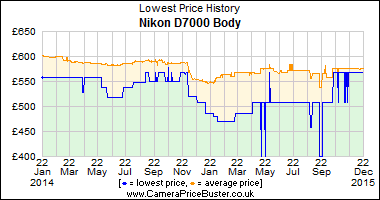
Wow, look at that, according to www.camerapricebuster.co.uk, since it's launch in mid-October, D7000 bodies are now shifting (or not shifting?) for £850, that's 23% down on the launch price!

Tuesday, February 08, 2011

Fujifilm Finepix X100

A few weeks back I wrote that Fujifilm's Finepix X100 would probably have a UK price tag of around £700, and how I felt this was a bit steep and that if I was in the market, I would probably go for an entry-level DSLR and small fixed-focal lens, like Nikons' 35mm f/1.8 DX instead.

Well, Fujifilm have commercially launched the X100 now, and it's available to pre-order at many UK dealers for around £1000 (the RRP in the UK). Wow! Good luck with that Fujifilm!

We've not seen any reviews yet, but the image quality from this camera would have to be truly outstanding at this price point for it to become anything else than an expensive accessory for the style conscious person who has not yet discovered the Leica X1.

Still, if anyone from Fujifilm UK reads this and wants to ship me one for review....